movisensXS April Update

Today we want to announce lots of new features we build into movisensXS. All your studies and configurations have been updated. Because this is a major release, you have to perform a few steps to use the new app:
  1. Upload all results from the device
  2. Update the movisensXS app to version 0.4.2453
  3. Synchronize your study
Please remember to deactivate automatic updates of movisensXS in the Play Store! It assures, that a study continues to run even if a new app version is released.

movisensXS guide

XS_guideWant to get the most out of movisensXS? Or have a question about how something works? Check out the all new movisensXS Guide.
Search the Guide for something specific, read it top-to-bottom, or get best practice tips about the sampling and the item formats.
We're updating the Guide frequently.

Introducing Delayable Alarms
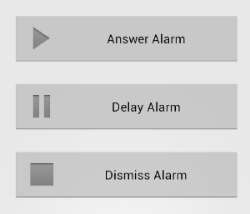
XS_alarm_featureNow the participant can delay an alarm, if he is currently busy. You can configure the maximum time the participant can delay an alarm and if he can dismiss an alarm. We think this feature can improve your study compliance even further.

Improved Excel result output

  • Dates are now split in separate date and time columns.
  • Select many options are now split into several columns (1=selected, 0=not selected).
  • A column added that indicates the completed form.
  • The columns are reordered.
XS_excel

Vote for the next features

We are always happy to get feedback how to improve our service. You can see planned features, suggest new ideas and vote for them. Leave your e-mail and we will notify you about feature updates.
Vote for the next features »

Smaller Improvements

  • Improved result graphs
  • Added possibility to track the amount of credits used by each study (included in billing)
  • Added support for international characters (e.g. Chinese)
  • Probands are now participant
  • App: Optimized likert scale and vas scale (possibility to hide marker)
  • App: Smaller GUI improvements
  • Lots of smaller bugs have been removed.
movisensXS Februar Update

Today we want to announce lots of new features we build into movisensXS. All your studies and configurations have been updated. Because this is a major release, you have to perform a few steps to use the new app:
  1. Upload all results from the device
  2. Update the movisensXS app to version 0.3.2303
  3. Finish the study and couple the device to a participant again
Please remember to deactivate automatic updates of movisensXS in the Play Store! It assures, that a study continues to run even if a new app version is released.

Introducing Reaction Time

XS_reaction_featureThanks to the Universität Koblenz-Landau you can now measure the time a participant needed to answer one item. You can do so by placing a Multi-Item Screen, adding the item you want to measure and also adding the Reaction Time item on the bottom of the screen. The reaction time will be recorded in milliseconds as the time from the screen being showed till the time the next button is pressed. It can be used e.g. to measure the compliance of the participant. Please be aware, that the reaction time can vary depending on the used device and current processes running in Android.

Introducing Auto Advance

The item formats Select One and Likert Scale are now configurable to activate Auto Advance. If it is activated and the participant selects an answer option he is automatically taken to the next screen. This can reduce answer time and improve the compliance.
In a Multi-Item Screen you can not set a time when the screen automatically advances to the next screen or item. This allows you to e.g. display texts only for a limited time.

Introducing Multimedia Items

XS_items_media_smallThanks to the Universitätsklinikum Carl Gustav Carus we can today announce multimedia items. You can now capture pictures, videos, audio and barcodes. Just drag and drop the new item formats into your study and you are ready to go. To download the results please use the dropdown button on the results page and select MultiMedia Results (ZIP).

Introducing Display Image Item Format

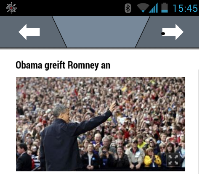
Again thanks to the Universität Koblenz-Landau you can now display images (e.g. show magazine articles the participant has to read.XS_Screenshot

Improved Study Control Screen

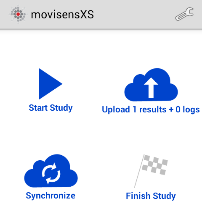
The study control screen has been completely redesigned. Now you can start or pause a study, upload the results, synchronize the study configuration with the server and finish the study for this participant on one screen.

XS_Screenshot_start

Define the Study Duration for Each Proband

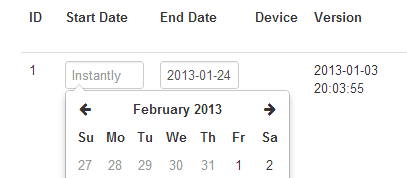
XS_durationNow you can define a start and end date for each proband. If you specified a date range, the sampling will only trigger the proband or show him buttons and forms if the current date is in the specified date range. If you do not define a start or end date, the sampling starts immediately or never ends. This date range is also compatible with the Sampling Daycondition, which allows you to define different sampling schemes on each sampling day.

Smaller Improvements

  • To remove the problem of using one couple-code accidently for two participants, the couple-codes are now invalid as soon as they have been used once. You can always refresh the study configuration for a proband in the study control screen.
  • We integrated the barcode scanner into movisensXS. You do not need to install a barcode scanner app any more.
  • The date formats changed for the Date Range condition. If you use one, please be sure to check if the dates are still correct.
  • Improved developer integration.
  • Lots of smaller bugs have been removed.

movisensXS Oktober Update

Today we are happy to announce lots of new features in movisensXS.

Simplified Branching

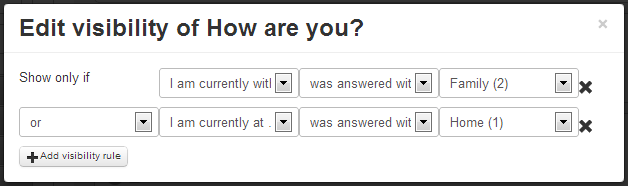
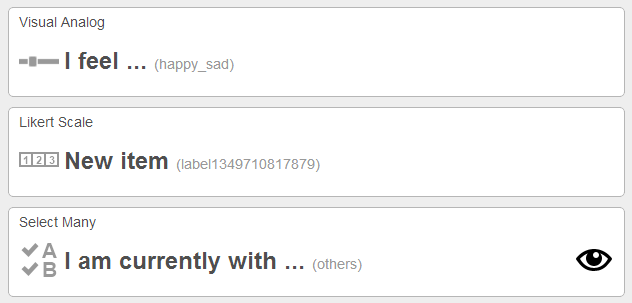
With the movisensXS forms editor you can now easily define if an item should show, depending on the answer of previous Select OneSelect Many and Likertitems. 
Important: If you have used the old Visibility Rule you need to update you configuration, because next time you couple a device the old Visibility Rulewill be deleted.

XS_Bild_13

Improved Forms Editor

We added new icons and new styles to make the use of the forms editor easier to use. You also see an the eye-icon if a visibility rule is defined.
XS_Bild_15

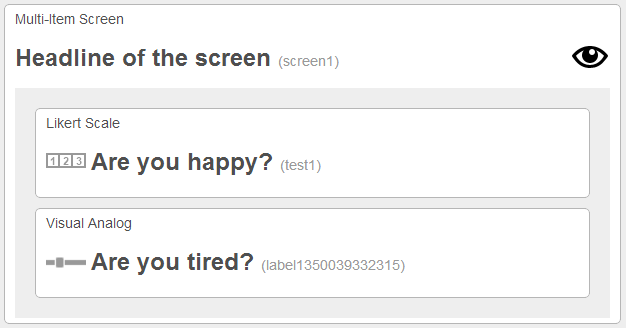
Multi-Item Screen

We have added the Multi-Item Screen which allows to present multiple items on one screen. Of course you can define visiblity rules for the screen and the items inside the screen.
XS_Bild_17

Download Results

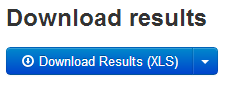
XS_Bild_20We have redesigned the results area. You can now download the whole study or download the results of each proband indiviually.

Smaller Improvements

  • Improved Tablet Support
  • Improved Alarm Screen
  • Improved Developer Integration

All your studies and configurations has been updated. To use them please update your movisensXS app and refresh your configuration in the study control screen.

movisensXS September Update

Today we're rolling out a new version (0.2.2048) with a few improvements.

movisensXS is now available on Google Play

XS_Bild_installThis makes installation and updating a lot easier. If you are still running an old version please grab the update here.

Likert Scale

XS_likert_scaleThe Likert Scale is one of the longest awaited features. It is now available. Just drag and drop it into your form.

Lots of smaller improvements

  • Added Demo Study ot the movisensXS App to testdrive the App
  • Added automatic restart after update of movisensXS App
  • Added option to refresh configuration
  • Improved preferences
  • Improved PIN entry
  • Improved locking of other apps
  • Fixed error with Inactivity Alarm
  • Fixed problem with GeoPoint Item
  • Smaller bugfixes
All your studies and configurations has been updated. To use them please update your movisensXS app and refresh your configuration in the study control screen (see red box on the image on the right).

movisens announces movisensXS, the next generation research tool for ambulatory assessment

Ambulatory assessment refers to the use of computer-assisted methodology for self-reports, behavior records, or physiological measurements, while the participant undergoes normal daily activities. This approach includes the experience sampling method (ESM) a.k.a. ecological momentary assessment (EMA).
Ambulatory Assessment has many advantages over traditional methods that are currently used in psychology like paper questionnaires or interviews:

  • Real-time assessment to increase accuracy and reduce retrospective biases
  • Assessment in real-life situations to enhance generalizability
  • Repeated assessments to allow investigation of dynamic processes

movisens provides researchers the tools to assess psychological, physiological, and behavioral data.

Today, movisens is announcing movisensXS a research tool to assess the ongoing behavior, experience and environmental aspects of humans in everyday life. It is tailored to the needs of ambulatory assessment and eXperience Sampling. movisensXS consists of an online tool to manage every aspect of a research study and a Smartphone app to capture data from participants. The online tool empowers you to design your study without any programming. You can realize any possible sampling scheme and configure every detail of your study.
Online at xs.movisens.com

The software is in private beta now and will be launching publicly end of this year.